
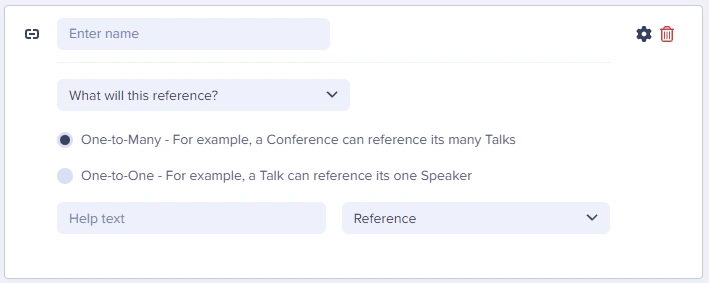
- one-to-one: reference one page or item
- one-to-many: reference more than one page or item
Field at a glance
Input and output
Input type
One-to-one or one-to-many links to Pages or Collections
API output
array (one-to-many) or object (one-to-one)API response
Varies by type, see responses below.Field configuration options
One-to-one vs. one-to-many references
One-to-one reference
Links to a single item or page. Use when content has exactly one related item. Examples:- Article → Author (each article has one author)
- Product → Brand (each product has one brand)
- Page → Primary Category
One-to-many reference
Links to multiple items or pages. Use when content can have multiple related items. Examples:- Article → Tags (article can have multiple tags)
- Product → Categories (product can be in multiple categories)
- Page → Related Articles
References vs. Repeaters
Ask yourself: “Will this content be managed independently and potentially used on multiple pages?” If yes, use a Reference to a Collection. If it’s page-specific content, use a Repeater.
Working with references in your application
- JavaScript
- Python
Best practices
Naming references
- Use descriptive names:
authornotref1 - Indicate plurality:
category(one-to-one) vscategories(one-to-many) - Match the Collection name: If Collection is “Authors”, Reference could be
author
Collection design for references
- Include a slug: Essential for filtering and URLs
- Add display fields: Name, title, image for rendering
- Keep Collections focused: One purpose per Collection
- Consider the API response: What data do you need when referencing?
Performance
- Limit referenced data: Don’t create huge Collection items
- Use filtering: Query only what you need
- Consider pagination: For large sets of referenced items
Use cases
How to use Reference fields in the ButterCMS dashboard
For common use-cases and how to implement them in the ButterCMS dashboard, see the article below:Working with references
How to implement common use cases, including categories (grouping/filtering), testimonials (reusable content), and related articles (linking related content).