
Write API import
For programmatic imports, use the ButterCMS Write API. This allows you to automate content creation without manual data entry.Note: Contact ButterCMS support at support@buttercms.com to enable Write API access on your account.
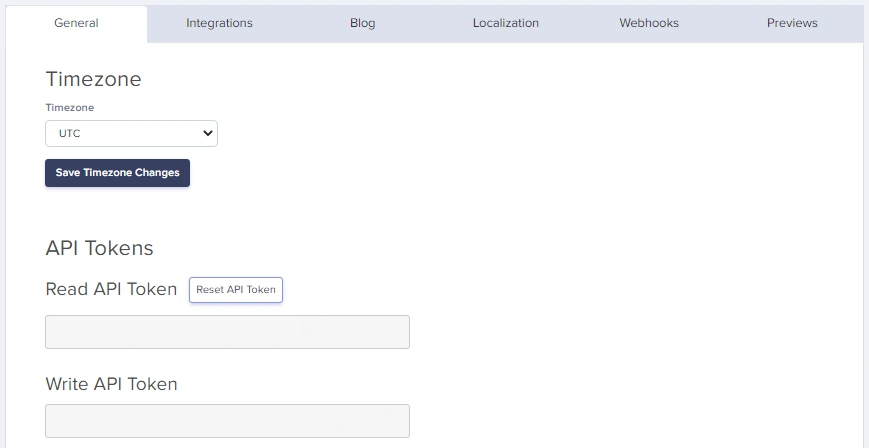
Getting your Write API token
- Navigate to Settings in your ButterCMS dashboard
- Go to the API Tokens tab
- Copy your Write API Token
Creating content via Write API
For full parameter details and code examples, see:Pages API Reference
Collections API Reference
Blog Engine API Reference
Supported SDKs
Write API tips
Working with references
To reference Collection items or other Pages, use their slugs or meta IDs:Working with media
ButterCMS can handle media in several ways: Option 1: External URLsalt_media_text=1.
Handling localized content
For multilingual content, include locale-specific fields:Working with Component Pickers
For pages with Component Pickers, pass an array of component objects:Import from CSV/spreadsheet
For content in spreadsheets, parse and import programmatically:Bulk upload
Bulk upload is ideal for:- Migrating hundreds or thousands of pages
- Importing product catalogs from e-commerce systems
- Loading content from databases or external APIs
- Populating Collections with reference data
- Automated content pipelines
Prerequisites
Before bulk uploading:- Write API access enabled - Contact support@buttercms.com
- Content types created - Page Types and Collections must exist
- Data source prepared - JSON, CSV, database, or API ready
- Field mapping documented - Know how source fields map to ButterCMS
Architecture
Complete bulk upload script
Here’s a complete Python script for bulk content migration:JavaScript/Node.js implementation
Data file format
Structure your data file for bulk upload:Handling large datasets
Batch processing
For very large datasets, process in batches:Progress tracking
Checkpoint/resume support
For very long migrations, implement checkpoint support:Request pacing
These delays help keep bulk migrations stable and reduce the chance of hitting monthly API call limits. Free and Trial plans have a 50,000 API calls per month limit.
Handling 429 responses
Validation before upload
Always validate data before uploading:Error handling
Handle common errors gracefully:Common error codes
This list covers common errors. For complete API error documentation, see API Reference.
Best practices
- Test with draft status first - Create as drafts, review, then publish
- Batch your imports - Import in small batches to identify issues early
- Log everything - Keep detailed logs of what was imported
- Validate before import - Check data quality before sending to API
- Monitor monthly limits - Use pacing and caching to stay within limits
- Use idempotent operations - Check if content exists before creating